01 · Stock groups
Separate product categories
Use a colour for each product group or storage zone. Include the item code and a readable description so staff can check the contents without relying on colour.
Free UK Delivery On Orders Over £60

Sign up and get 15% off your first Go2Products order, plus occasional offers and product updates.
STOCK, STORAGE & ORGANISATION
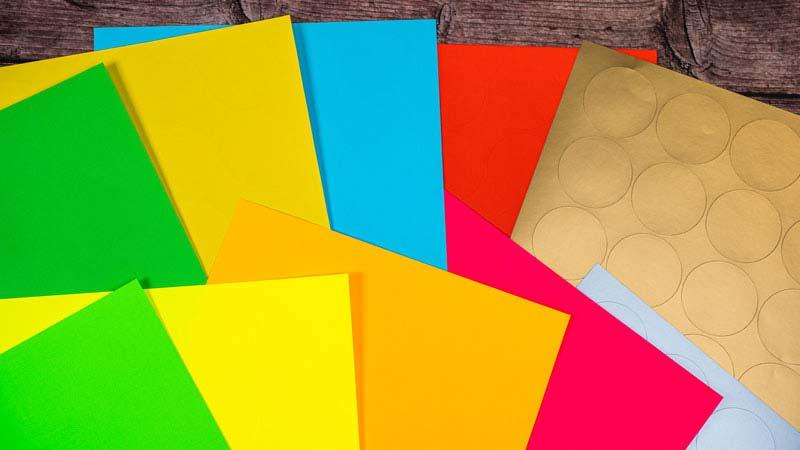
Make everyday identification easier with a simple label system. Choose colours for your stock, shelves, files or work stages, then add clear text so everyone knows what each label means.
A SYSTEM PEOPLE CAN FOLLOW
Use colour to support identification, then print or write the details that matter. A label reading “Shelf B3” or “Awaiting inspection” is more useful than an unexplained coloured dot.
PRACTICAL APPLICATIONS
Start with one area where people regularly need to identify, sort or locate items.
01 · Stock groups
Use a colour for each product group or storage zone. Include the item code and a readable description so staff can check the contents without relying on colour.
02 · Shelves & bins
Label shelves, drawers and storage bins with a colour and a location reference. Repeat the same location code on picking lists or stock records where useful.
03 · Files & records
Distinguish departments, projects or document categories with coloured labels. Add a project name, reference or year to make the filing system easy to maintain.
04 · Work in progress
Use explicit wording such as “Awaiting check”, “Ready for packing” or “Hold for review”. Define who changes the status and when the label should be replaced.
05 · Dates & batches
Use colours as a secondary cue alongside the actual date, batch and product information. Follow your established rotation procedure rather than relying on a colour by itself.
06 · Shared storage
Identify boxes, supplies and equipment groups in offices, workshops or classrooms. Add a room, team or storage reference so items can be returned to the right place.
SET IT UP ONCE
CHOOSE YOUR MATERIAL
Red, green, yellow and blue paper labels for routine identification. Suitable for compatible inkjet and laser printers.
Shop coloured A4 labels →A brighter background for information needing stronger visual emphasis. These fluorescent sheets are for laser printing only.
Shop fluorescent labels →A neutral background for clear text, detailed information and testing barcode contrast. Suitable for compatible inkjet and laser printers.
Shop matt white labels →The coloured, fluorescent and matt white products linked above have permanent adhesive. For changing shelf information or short-term identification, a removable material may be more appropriate. Adhesion and removal depend on the surface and conditions, so test first.
PRINT YOUR OWN OR LET US HELP
Choose an exact sheet layout and use its matching template. Print at Actual Size and check alignment before using a label sheet.
Find label templates →Supply your text, codes or artwork and choose an available size, material and quantity for professionally printed sheets.
Order personalised labels →Explore made-to-order labels for additional specifications. Prices, quantities and lead times can differ from stocked products.
Explore made-to-order sizes →Need a specification checked? Request a personalised quote.
YOUR QUESTIONS ANSWERED
Colour-coding labels help distinguish stock groups, storage locations, files, departments and work stages. Use a written key and readable text alongside each colour so people can understand the system consistently.
Choose colours that your team can easily distinguish, then assign each one a clearly defined meaning. There is no single colour scheme that suits every business. Keep a visible key and avoid assigning conflicting meanings to the same colour.
Standard matt coloured, brown kraft and matt white labels in the ranges linked here support compatible inkjet and laser printers. Our fluorescent and metallic ranges are for laser printing, not inkjet printing. Check your printer manual and use the matching A4 template.
Standard coloured paper is useful for routine identification. Fluorescent labels provide a brighter background for labels needing stronger visual emphasis. Use readable text and symbols rather than relying on colour alone.
The ranges linked here use permanent adhesive, so do not assume they can be removed cleanly. For temporary markings or frequently changing information, consider a removable label and test it on the intended surface first.
Include a clear barcode area and test the final printed label with your scanner. Black print on a white background is a useful starting point. Coloured backgrounds and finishes can affect scanning, so test before producing a batch.
These paper ranges should not be assumed suitable for outdoor exposure, condensation or freezer conditions. Choose a material and adhesive specified for the application and test the complete printed label.
Yes. Choose our personalised sheet labels for printed text, codes or artwork on an available material and layout. Request a quote if you need a different specification or help planning a repeat order.
Use our label templates page to find the exact size and layout. Print at 100% or Actual Size with scaling disabled. Check alignment on plain paper before printing onto a label sheet.